OpenClaw Is Powerful. Your Laptop Is the Wrong Place to Run It.
OpenClaw turns AI models into agents that can actually do work — read files, browse, run commands, message you back. Here's what it is, why your laptop is the wrong place to run it, and how to set it up safely.

OpenClaw turns AI models into agents that can actually do work, read files, browse, run commands, message you back. Here's what it is, why your laptop is the wrong place to run it, and how to set it up safely.
TL;DR
- OpenClaw is a free, open-source framework that turns AI models like Claude or GPT into an assistant you message on Telegram or WhatsApp — one that can actually do things, not just chat.
- Its power is its risk. An agent that can read files and run commands on your laptop can reach everything on your laptop.
- The safe default is isolation: a separate, always-on environment with narrow permissions. That's the gap Tinyloop closes — a cloud computer with OpenClaw pre-installed, connected to your own private Telegram bot.
OpenClaw is exciting because it gives AI agents the ability to actually do work. It is risky for the exact same reason.
Once an agent can read files, run commands, and act through your messaging apps, you are no longer experimenting with a chatbot. You are giving software operational access to your digital life.
That is why the default way to try OpenClaw should not be your personal laptop. It should be an isolated, always-on environment built for experimentation. That is the problem Tinyloop is solving.
What Is OpenClaw, Exactly?
If you've seen the name everywhere but aren't sure what it actually is, here's the 60-second version.
OpenClaw is an open-source AI agent framework. You set it up once, connect it to a messaging app you already use — Telegram, WhatsApp, Discord, Slack — and from then on you have an AI assistant you message like a coworker.
It has three parts:
- A model: Claude, ChatGPT, Gemini, or another LLM. This is the brain.
- Tools: files, a browser, a terminal, calendars, CRMs, codebases, APIs. These are the hands.
- A channel: the messaging app where you talk to it. No new app to open.
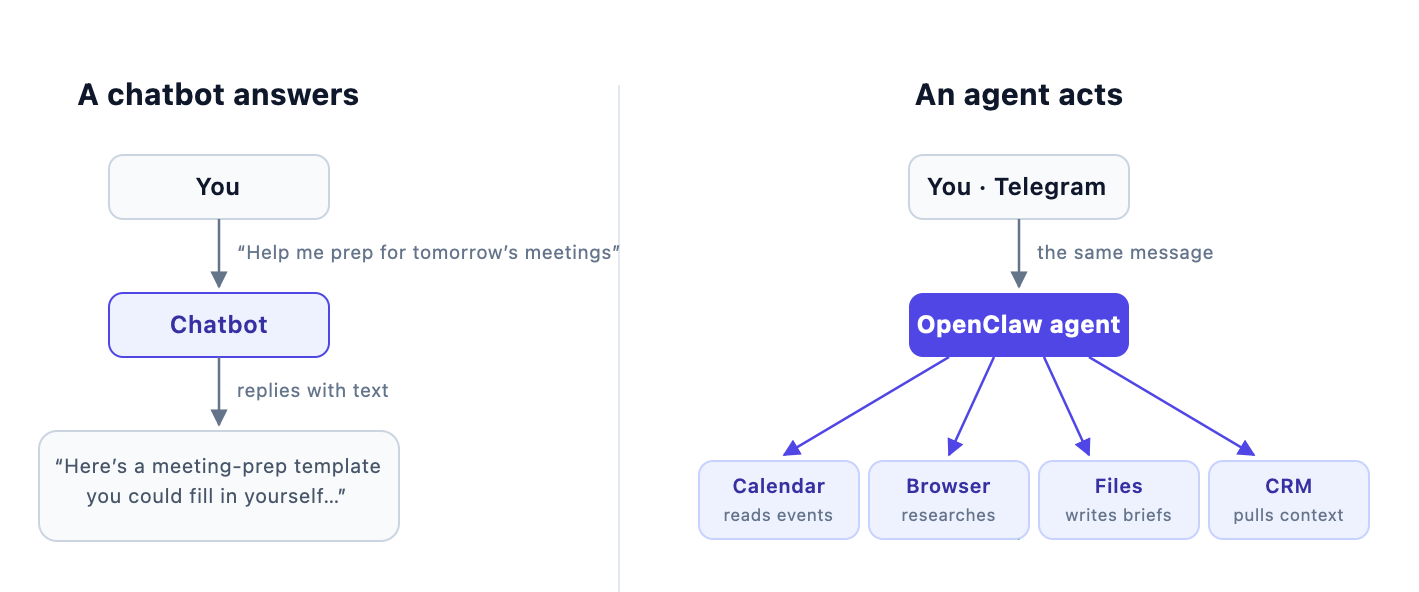
Here's the difference in practice. Ask a chatbot "help me prep for tomorrow's meetings" and it gives you advice. Send the same message to OpenClaw and it opens your calendar, looks up who you're meeting, researches them, writes a brief for each meeting, and drops the briefs into your chat.
A few things OpenClaw is not, because this trips people up:
- It's not a model. It's the layer that connects models to tools and to you.
- It's not a hosted product. Nobody runs it for you — you run it somewhere. Which is exactly why where you run it matters.
- It's not locked to one AI provider. You can swap models underneath it.
This is the real shift. OpenClaw gives an AI model hands. And giving a model hands means deciding where those hands are allowed to reach.
What People Actually Use It For
OpenClaw shines when a task involves multiple steps, multiple tools, or repeated follow-up — workflows where you'd normally bounce between apps, copy things around, and then act.
- Personal assistant: email summaries, calendar prep, reminders, daily briefings.
- Research and monitoring: competitors, job posts, market signals, news.
- Coding and engineering: repo inspection, bug fixes, tests, logs — including from your phone.
- Business operations: support triage, CRM updates, call summaries, follow-ups, reporting.
- Content and marketing: topic research, outlines, drafts, repurposing, publishing.
- Team automation: small operational tasks across Slack, Notion, GitHub, and Drive, delegated through chat.
OpenClaw is not another place to ask AI questions. It is a way to let AI participate in workflows.
And the moment an agent participates in workflows, the security model changes.
Your Laptop Is a Bad Default Sandbox
The fastest way to try OpenClaw is to run it locally. For developers who want to inspect the system, that makes sense.
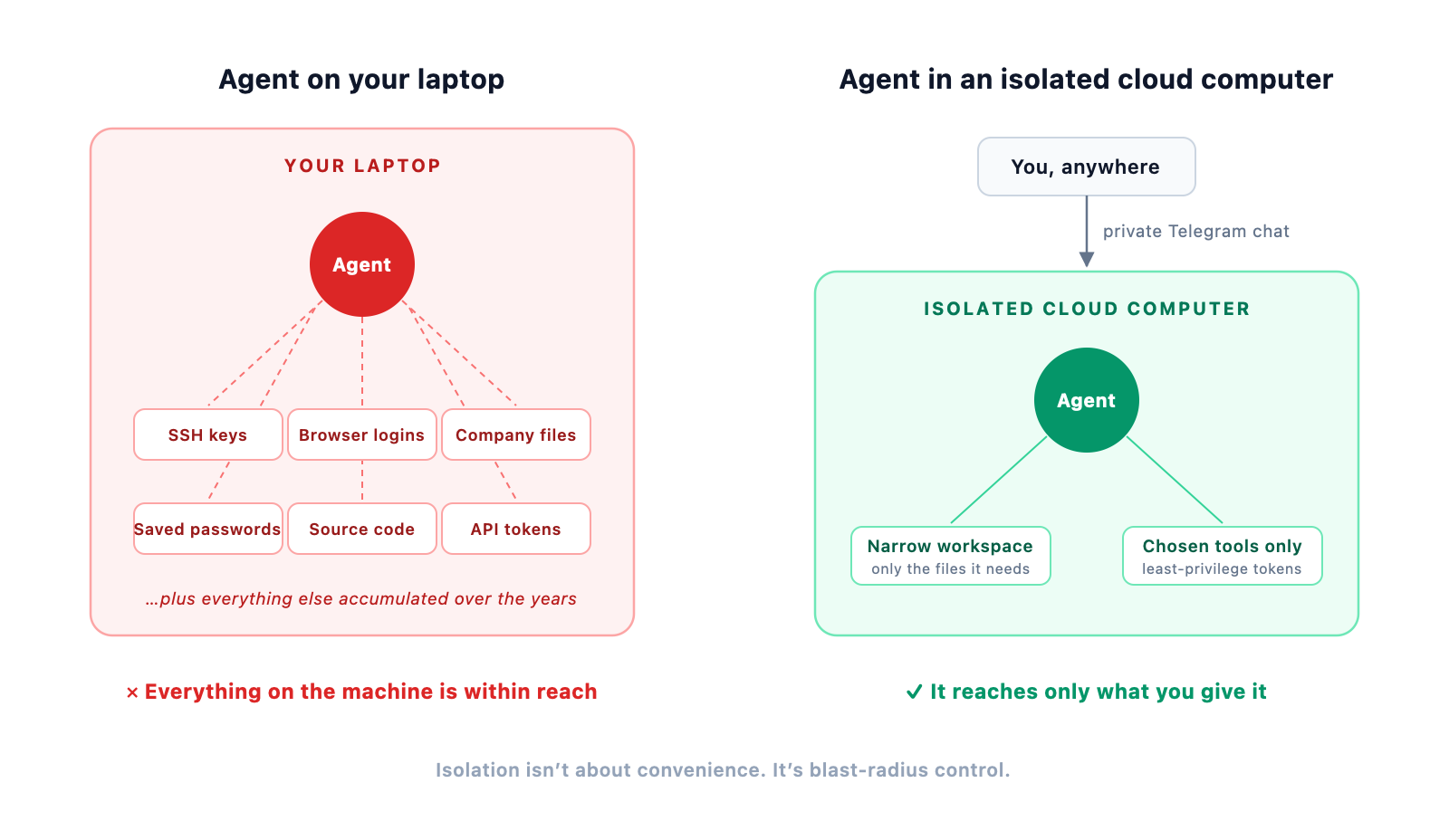
For most founders, operators, and business teams, it's the wrong default — not because OpenClaw is reckless, but because your laptop is messy. Browser sessions, SSH keys, company files, saved credentials, screenshots, years of accumulated documents. That is a terrible sandbox for a brand-new agent.
Three practical problems:
- Too much private context. Give an agent broad local access and you expose far more than any task requires.
- Not always on. Laptops sleep, travel, and drop off Wi-Fi. An always-on assistant shouldn't depend on whether your computer happens to be open.
- Too much setup. Dependencies, messaging channels, secrets, updates, debugging. Most people want to experience what an agent can do — not become an infrastructure engineer first.
The Real Risk Is Over-Permissioning
OpenClaw's risk comes from the same thing that makes it useful: tool access. If it can read files, it can read sensitive files. If it can use a browser, it can touch logged-in sessions. If it connects to email, Slack, or your CRM, it touches real business data.
The biggest risks are practical, not abstract:
- Over-permissioned agents: access to a whole machine when the task needs one folder.
- Prompt injection: webpages, emails, and documents can contain instructions that manipulate the agent.
- Secret exposure: API keys, tokens, browser sessions, and SSH credentials become high-value targets.
- Unsafe tool execution: file writes, shell commands, and deployments need boundaries.
- Public exposure: unprotected dashboards, gateways, and bot endpoints.
- Weak operations: no logs, no backups, no approval steps, no separation between testing and production.
How to Run OpenClaw Safely
A better setup starts with isolation: the agent runs somewhere separate from your personal machine. The point is not convenience. The point is blast-radius control.
Good defaults:
- ✅ Run OpenClaw in a dedicated environment — never your daily laptop.
- ✅ Give it a narrow workspace, not your home directory.
- ✅ Use least-privilege API tokens, kept in a managed secret store.
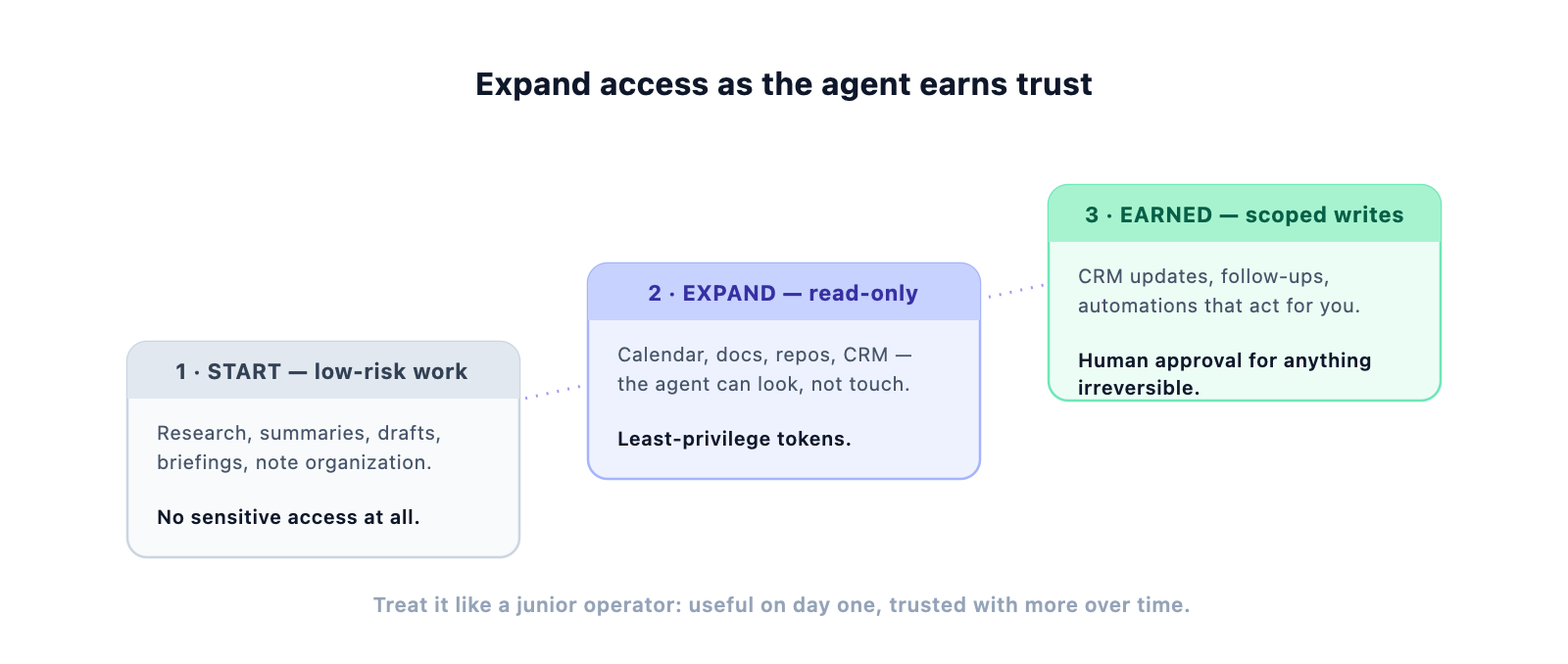
- ✅ Require human approval for emails, public posts, deletes, purchases, and production changes.
- ✅ Keep gateways, dashboards, and messaging integrations protected.
- ✅ Update OpenClaw and its dependencies regularly.
- ✅ Start with low-risk workflows; connect sensitive systems only after the agent earns it.
So where should the dedicated environment live?
| Your laptop | Dedicated Mac mini | Cloud computer | |
|---|---|---|---|
| Isolated from your personal data | ❌ No | ✅ Yes | ✅ Yes |
| Always on | ❌ Sleeps, travels | ⚠️ If you maintain it | ✅ Yes |
| Setup effort | High | High | ✅ Minutes |
| Maintenance | You | You | ✅ Handled |
| Easy to reset | ❌ It's your laptop | ⚠️ Manual | ✅ One click |
A Mac mini works if you want hardware you control — it stays plugged in and gives the agent a stable home. But you still own setup, updates, networking, and security hardening.
A cloud computer is usually the more practical path: always on, separate by design, easy to reset, easy to reason about. That is the gap Tinyloop closes.
Where Tinyloop Fits
Tinyloop's job is not to make OpenClaw less powerful. It is to make your first experience with it less dangerous, less technical, and more useful.
Tinyloop gives you an AI-enabled cloud computer with OpenClaw already installed, connected to a private Telegram bot that belongs to you. No infrastructure afternoon. The agent never touches your personal laptop.
- One-click start: an OpenClaw-ready computer without provisioning anything.
- Private by default: you talk to your agent through your own private Telegram chat.
- Isolated environment: separate from your laptop, browser data, and personal files.
- Always available: keeps running when your laptop is closed.
- Tool-ready: connect only the tools and secrets you actually want it to use.
- Practical onboarding: try real workflows first; add access as you learn what's useful.
This matters because most people don't know what they want from an AI agent until they try one. The first step shouldn't be a complicated local install. It should be a safe place to explore — research something, summarize messages, draft content, inspect a repo, build a small automation. Once you see which workflows save time, then decide what to connect.
Start With Power, But Add Boundaries
OpenClaw is one of the clearest examples of where AI software is going: from answering questions to operating tools. It can become a chief of staff, a coding assistant, a research analyst, a business automation layer.
If you want to understand what AI agents can actually do, OpenClaw is worth trying. Just don't start by handing it your personal laptop. Start with a clean environment, narrow permissions, and a setup you can reset.
OpenClaw gives you the agent. Tinyloop gives it a safer place to work.
FAQ
Is OpenClaw free?
The framework is open source and free. You pay for the AI model usage behind it (API keys) and for wherever it runs.
Do I need to be a developer to use it?
To run it on your own machine — realistically, yes: installs, configs, secrets, debugging. That's the barrier Tinyloop removes with a pre-configured cloud computer.
Which messaging apps does it work with?
Telegram, WhatsApp, Discord, Slack, and others. Tinyloop connects yours to a private Telegram bot out of the box.
Can it actually do damage?
Only to what it can reach. That's the entire argument for isolation: run it where the blast radius is a sandbox, not your digital life.
Ready to try OpenClaw safely?
Start with an isolated cloud computer instead of your personal laptop.

Comments ()